Easy Configuration of Operational Schedules
The AVEVA Scheduler App has two components that are installed and configured within AVEVA System Platform:
- The Scheduler App component is used to create, manage, and delete schedules, events, subsystems, zones, time periods, and holidays.
- The Scheduler Object component executes the created schedules when the scheduled time, or other conditions specified in the object, are met.

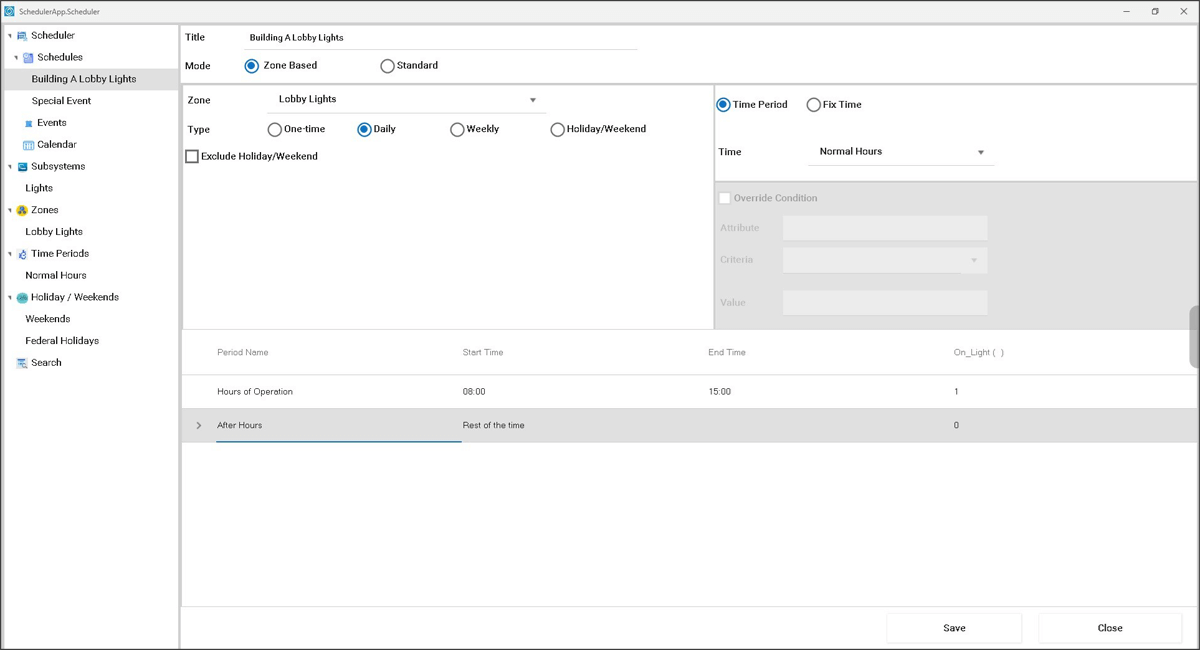
Multiple Scheduling Options
- The One-Time Schedule executes only once when the scheduled time occurs.
- A Daily Schedule executes every day when the scheduled time occurs.
- A Weekly Schedule executes on the selected day(s) of the week when the scheduled time occurs.
- An Event-Based Schedule executes when an event occurs.
- Zone-Based Schedules can be either Fix-Time Schedules or Time Period Schedules.
Make changes to Schedules
Simple configurable options provided:
- Override
- Update
- Delete schedules

Specifications
Type
Developer Tools
Optimized Scenario
Automate scheduling process parameters and configure operational schedules for a supported subsystem such as street lighting with an integrated Building Management System.
Available on
PC
Languages
English
System Requirements
AVEVA System Platform 2017 Update 3 Service Pack 1 or above

AVEVA Group Limited
AVEVA creates industrial software that inspires people to shape the future. We believe industry advancement should enhance the human experience.
Related Products
AVEVA™ Video Viewer OMI App
Display a pre-recorded video within a pane of an AVEVA Operations Management Interface (OMI) application with functionality like viewing a video on a web page.
AVEVA™ NET DataViewer OMI App
View selected tag details and tag attributes available from AVEVA Asset Information Management within AVEVA Operations Management Interface (OMI).
AVEVA™ NET DocumentViewer OMI App
View and open 2D documents of a selected tag that are available from AVEVA Asset Information Management within AVEVA Operations Management Interface (OMI).
AVEVA™ File Viewer OMI App
With these four OMI Apps you can bring documents, images, and spreadsheets into your AVEVA Operations Management Interface (OMI) applications that will automatically change as the user navigates to different assets.
AVEVA InTouch HMI, formerly Wonderware
Formerly Known As InTouch HMI
AVEVA InTouch HMI is HMI visualization software for operators to achieve real-time operations visibility. The world’s most widely used plant HMI for process monitoring and control.
AVEVA System Platform, formerly Wonderware
Contextualize operations with responsive, standards-driven, and scalable software for deploying advanced SCADA, MES, and IIoT. Unify people, processes, and assets.


